Why RO Security Filter ΔP Rises Rapidly Even When the Micron Rating Is Correct
When an RO security filter ΔP rises rapidly after cartridge replacement, many operators first suspect the micron rating.
But in real RO pretreatment systems, rapid pressure drop increase is often not caused by micron rating alone. The real problem may come from fine colloids, iron particles, flocculant carryover, UF permeate instability, or surface blinding of the cartridge media.
If contaminants accumulate mainly on the outer surface, the cartridge may reach terminal ΔP quickly even though much of the internal media depth has not been fully used.
This article explains why cartridge ΔP rises quickly, how to read field symptoms, and when the cartridge structure should be reviewed instead of only changing the micron rating.
Quick Answer: Why Does Filter Cartridge ΔP Increase?
Filter cartridge differential pressure increases because the cartridge is capturing contaminants and the flow paths inside the media gradually become restricted.
A gradual ΔP increase is normal during cartridge loading.
A rapid ΔP increase is different. It usually indicates abnormal contaminant loading, upstream pretreatment instability, surface blinding, unsuitable media structure, or insufficient dirt holding capacity.
In RO pretreatment systems, rapid ΔP rise is commonly linked to:
- UF permeate quality fluctuation
- Fine colloids reaching the security filter
- Iron particles or corrosion products
- Flocculant carryover
- Organic or biological fouling
- Surface blinding before the media depth is fully used
- Cartridge structure not matching the actual contaminant load
Related Solution
If your RO security filter shows rapid ΔP rise, short cartridge life, or unstable replacement cycles, the cartridge structure may need to be reviewed — not only the micron rating.
Recommended pages:
- RO Pretreatment Filtration Solution
- HFL Series High Flow Filter Cartridge
- Request a Compatibility Check
Is an Increasing DP Always a Bad Sign?
No. A gradually increasing DP is a normal and expected sign of a filter cartridge life cycle.
It shows that the filter is capturing particles. The real question is not whether ΔP increases, but how fast it increases.
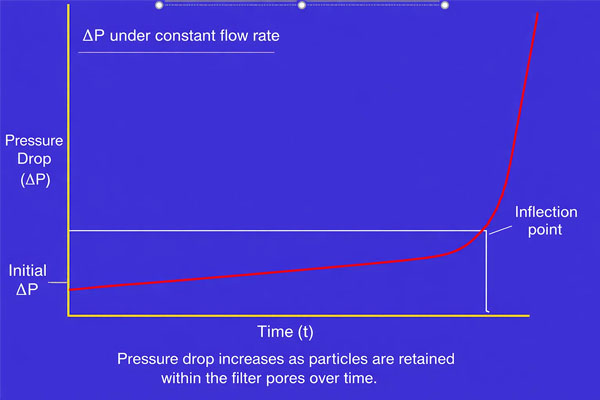
A healthy filter usually follows a predictable loading curve:
- Clean filter: low and stable initial ΔP
- Normal loading: slow and steady ΔP increase
- Terminal stage: sharp ΔP increase near the end of useful life
When ΔP increases gradually, operators can plan cartridge replacement in advance.
When ΔP rises too quickly, especially within hours or a few days after replacement, it should be treated as a warning signal.
The Normal Life Cycle of a Filter Cartridge
A healthy cartridge usually follows a predictable pattern. Understanding this baseline helps operators distinguish normal loading from abnormal fouling.
| Stage | Description | DP Behavior |
|---|---|---|
| Startup | The filter is new and clean. | Very low and stable. This is the clean DP. |
| Loading | The filter actively captures contaminants. | ΔP rises slowly and steadily as pores and media depth load with particles. |
| Terminal | The cartridge approaches its maximum dirt holding capacity. | ΔP rises sharply, indicating the cartridge should be replaced. |
Monitoring this curve helps turn cartridge replacement from emergency maintenance into planned maintenance.
What Causes a Sudden or Rapid Increase in Pressure Difference?
A rapid DP increase is usually an alarm signal. It means the filter is not loading in a stable and predictable way.
In RO pretreatment and industrial water systems, rapid ΔP rise is often caused by one or more of the following conditions.
1. Upstream Pretreatment Instability
This is one of the most common reasons.
If upstream systems such as multimedia filters, clarification, UF, or chemical dosing become unstable, more fine particles can pass downstream into the security filter.
Examples include:
- UF permeate quality fluctuation
- Multimedia filter breakthrough
- Sudden raw water turbidity increase
- Iron carryover
- Algae or biological loading
- Heavy rainfall causing higher suspended solids
- Chemical dosing imbalance
In this case, the security filter is not the root cause. It is showing the problem through rapid ΔP rise.
2. Surface Blinding
Surface blinding occurs when contaminants accumulate mainly on the outer surface of the cartridge media.
This is different from healthy depth loading.
In healthy depth loading, particles are distributed gradually through the media layers. This allows more of the filter depth to be used.
In surface blinding, particles quickly form a dense layer on the upstream surface. Once this layer restricts flow, ΔP rises rapidly even though the internal media may still be relatively clean.
Surface blinding is often caused by:
- Fine colloids
- Iron particles
- Sticky organic matter
- Flocculant carryover
- Biological debris
- High particle load entering suddenly
3. Fine Colloidal Loading
Fine colloids are difficult to control because they may pass through upstream pretreatment and overload the final cartridge stage.
In RO pretreatment systems, fine colloids may come from:
- UF instability
- Coagulation/flocculation imbalance
- Iron carryover
- Organic matter
- Corrosion products
- Algae-related particles
These contaminants can create a dense fouling layer on the cartridge surface, causing rapid ΔP increase and short cartridge life.
4. Incorrect Filter Selection
Sometimes the cartridge is technically “correct” by micron rating but still unsuitable for the real operating condition.
For example, using a very fine micron rating in a system with unstable upstream solids may cause premature blockage.
However, micron rating is only one factor. Cartridge life also depends on:
- Effective filtration area
- Media depth
- Dirt holding capacity
- Pleat structure
- Flow distribution
- Support strength
- Actual contaminant load
This is why two cartridges with the same micron rating can perform very differently in real plants.
5. Biological or Organic Fouling
In warm water systems, biological activity can increase rapidly.
Bacteria, algae, biofilm fragments, and organic matter can create sticky fouling on the cartridge surface. This kind of fouling can blind the media quickly even if the particle count is not extremely high.
This is often seen in:
- RO pretreatment systems during warm seasons
- Cooling water systems
- Surface water treatment
- Wastewater reuse systems
- Systems with insufficient biological control
6. Chemical Carryover or Flocculant Overdose
Excess flocculant can create sticky flocs that overload cartridge filters.
If flocculant carryover reaches the RO security filter, it can cause:
- Surface blinding
- Sticky fouling layer
- Rapid ΔP rise
- Short cartridge life
- Unstable operation between batches or skids
In this case, simply changing the cartridge micron rating may not solve the problem. Chemical dosing and upstream clarification performance should also be reviewed.
How to Read the ΔP Rise Pattern
The speed and pattern of ΔP increase can tell operators a lot about what is happening inside the filter housing.
| Field Symptom | Possible Cause |
|---|---|
| ΔP rises rapidly within a short time after cartridge replacement | Surface blinding or sudden upstream contaminant breakthrough |
| Cartridge surface becomes dark, sticky, or heavily loaded | Iron particles, organics, flocculant carryover, or biological debris |
| Same micron rating but shorter service life | Insufficient media depth, lower dirt holding capacity, or higher particle loading |
| ΔP rises after UF instability | Fine colloids or suspended solids passing through upstream pretreatment |
| Internal media remains relatively clean after replacement | Contaminants are loading mainly on the surface instead of using full media depth |
| Cartridge life changes by season | Biological activity, algae growth, temperature change, or raw water fluctuation |
| Different skids show different ΔP behavior | Flow distribution, upstream condition, or operating load may not be consistent |
This is why used cartridge inspection is useful. The fouling pattern can often reveal whether the cartridge is experiencing normal depth loading or premature surface blinding.
Is Micron Rating the Only Factor?
No.
Micron rating is important, but it is not enough to determine cartridge life.
A 5 micron cartridge may last longer than another 5 micron cartridge if it has:
- Larger filtration area
- Better media depth
- Higher dirt holding capacity
- More stable pleat structure
- Stronger support cage
- Better flow distribution
- More suitable media for the contaminant type
In some systems, reducing the micron rating may even make the problem worse.
If the upstream particle load is unstable, a finer cartridge may clog faster without solving the root cause.
When Is Short Cartridge Life a Filter Problem — and When Is It a Pretreatment Problem?
Short cartridge life can come from either the filter cartridge itself or the upstream system.
The key is to review the full operating condition instead of blaming only the cartridge.
| Situation | More Likely Related To |
|---|---|
| ΔP rises slowly and predictably | Normal cartridge loading |
| ΔP rises suddenly after raw water fluctuation | Upstream pretreatment instability |
| Cartridge surface is heavily blinded | Surface loading, colloids, flocculant, organics |
| Cartridge collapses or deforms | Mechanical strength, high ΔP, or unsuitable structure |
| Same filter performs differently between systems | Feed water quality and operating condition |
| Internal media is still clean | Poor depth utilization or surface blinding |
| Cartridge life improves after upstream stabilization | Pretreatment issue rather than cartridge quality issue |
The best diagnosis comes from combining:
- ΔP trend
- Used cartridge condition
- Upstream water quality data
- Replacement cycle
- Operating flow rate
- Cartridge structure
How Can You Manage and Predict Filter Change-Outs?
You can manage DP by consistently tracking pressure readings and establishing a baseline performance curve for your filters.
The goal is not to wait until the filter is completely blocked. The goal is to set a controlled terminal ΔP and replace the cartridge before system performance becomes unstable.
In many industrial systems, operators set a change-out pressure based on system design, pump condition, cartridge structure, and process requirements.
Common practice may include recording:
- Clean DP after new cartridge installation
- Daily or shift-based operating DP
- Flow rate
- Operating temperature
- Replacement date
- Fouling appearance after removal
- Upstream pretreatment condition
A Simple Strategy for DP Management
| Step | Action | Benefit |
|---|---|---|
| 1. Record Clean DP | Install a new filter and record the starting DP. | Establishes the system baseline. |
| 2. Set Terminal DP | Decide a change-out pressure based on system requirements. | Creates a clear and consistent action trigger. |
| 3. Log DP Regularly | Record DP at the same time every day or shift. | Helps identify normal and abnormal trends. |
| 4. Inspect Used Cartridges | Check whether fouling is on the surface or distributed through the media depth. | Helps identify surface blinding, colloids, or normal depth loading. |
| 5. Review Upstream Conditions | Check UF, media filter, raw water fluctuation, and chemical dosing. | Helps determine whether the root cause is upstream or cartridge-related. |
| 6. Schedule Change-Outs | Replace cartridges before terminal DP creates operational risk. | Reduces emergency shutdowns and unplanned maintenance. |
This process helps operators move from reactive replacement to data-driven filter management.
When Should Cartridge Structure Be Reviewed?
If the cartridge reaches terminal ΔP too quickly while upstream conditions remain relatively stable, the filter structure should be reviewed.
Important design factors include:
Filtration Area
A larger effective filtration area can reduce flow stress on the media and help slow down ΔP growth.
Media Depth
Depth-loading media helps contaminants distribute through multiple layers instead of accumulating only on the surface.
Dirt Holding Capacity
Higher dirt holding capacity supports longer service life under stable operating conditions.
Support Structure
A reinforced cage and internal support core help maintain cartridge integrity under high flow and differential pressure.
Flow Direction
For many high flow cartridge systems, inside-to-outside flow helps retain contaminants inside the cartridge core and reduce release during replacement.
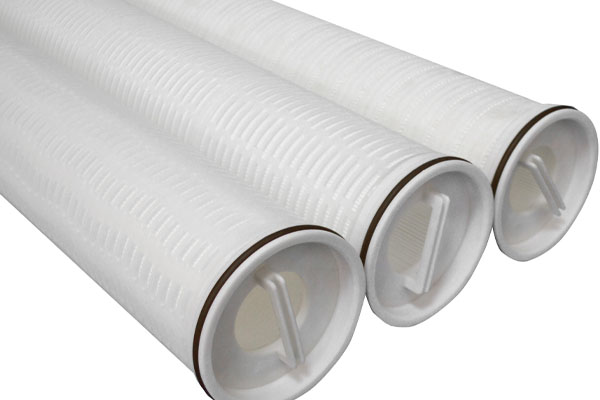
How High Flow Filter Cartridges Help in RO Security Filtration
In RO pretreatment systems, high flow filter cartridges are often used as the final security filtration stage before the high-pressure pump and RO membranes.
They are selected because they can provide:
- Large filtration area
- High flow capacity per cartridge
- Fewer cartridges required
- Lower changeout workload
- Stable ΔP growth under suitable operating conditions
- Higher dirt holding capacity compared with many standard cartridge configurations
- Compatible replacement options for existing Pall, 3M, Parker, or similar high flow housings
However, high flow filters should still be selected based on actual system conditions, not only nominal micron rating.
Key information for selection includes:
- Current cartridge model
- Cartridge length
- Micron rating
- Media type
- End cap or adaptor type
- Housing photo
- Flow rate
- Operating temperature
- Current ΔP trend
- Replacement cycle
- Upstream pretreatment condition
Need to Diagnose Rapid ΔP Rise in Your RO Security Filter?
If your RO security filter shows rapid ΔP rise, short cartridge life, or unstable replacement cycles, send us your current cartridge model, used cartridge photo, ΔP trend, or operating condition.
Ecofiltrone can help check whether the issue may be related to:
- Cartridge structure
- Media selection
- Dirt holding capacity
- Surface blinding
- Upstream contaminant breakthrough
- Housing compatibility
- Pall / 3M / Parker replacement requirements
Conclusion
An increasing DP is not always a bad sign. A gradual increase usually means the filter cartridge is doing its job.
The real warning signal is a rapid or unstable ΔP rise.
In RO pretreatment systems, rapid security filter ΔP increase is often related to upstream instability, fine colloids, iron particles, flocculant carryover, biological fouling, or surface blinding.
Instead of changing only the micron rating, operators should review the full system condition, used cartridge appearance, ΔP trend, and cartridge structure.
A better understanding of ΔP behavior can help improve cartridge life, reduce unplanned shutdowns, and protect the RO membrane system more effectively.